Friday, January 7, 2011

Day 6

(Yeah it’s a little late. lol) We spent all day at my mother’s yesterday babysitting, and then staying for dinner. The picture is of Princess Pudding playing with Prince Zoo’s backpack. lol It’s almost as big as she is.

SOOC – Princess Pudding, January 6, 2011

Editing – levels layer adjustment, selective sharpening, selective contrast and saturation adjustments

Special edit – My Four Hens’ actions Minced and Warmed (at 50%) from the Cook Book set.

(click them for full size)

Wednesday, January 5, 2011

Day 5

I’m going to walk you through this edit 100%. :o)

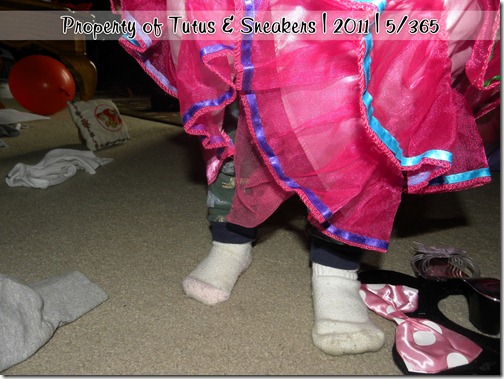
This is a picture of Princess Pudding playing today. (We spend lots of days like this – jammies and dress up dresses all day long lol) Gotta love a girl who wants to wear dinosaur jammies under princess dresses.

SOOC – Princess Pudding, January 5, 2011
First, let’s do Layers>New Adjustment Layer>Levels
TaS1511b

Next, Layers>New Adjustment Layer>Color Balance
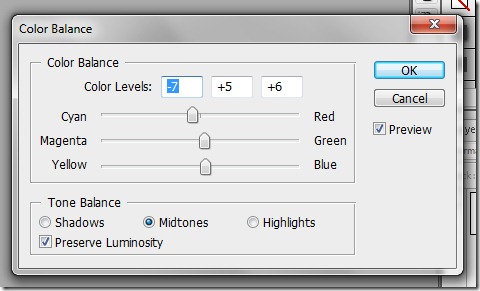
TaS1511c

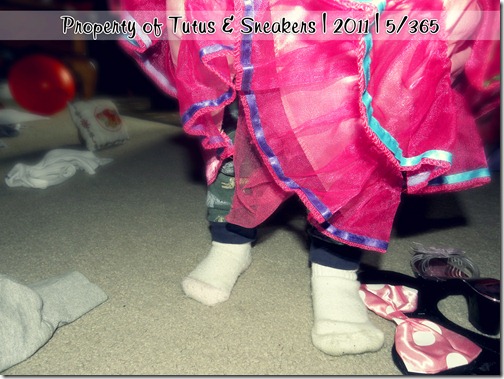
Photo after those:

If I wanted to do just plain ol’ editing I’d leave it at that, that is fine, BUT I want to do a tad more tweaking. First things first, I’m going to blur out some of the background. Duplicate your work window by going to image duplicate (this is so you mess up you can go back to this point easily). Merge all your layers and then duplicate the image. Go to Layer>New Fill Layer>Gradient. After clicking ok the gradient box will pop up, change your angle from 90 to –90. (Your angle changes from picture to picture by the way, you’ll figure out how to determine your angle as I go along). Move your duplicate image over the gradient, then right click the image and select create clipping mask. Making sure the image (not gradient) is still selected go to Filter>Blur>Lens Blur and then fool around with the settings until you get a blur you are happy with. Now merge your blurry image and gradient into one layer. Duplicate it, then hide one of the duplicates. (yes again, in case you mess up) Take the blurry image you have showing and carefully erase any pieces you don’t want blurry.
  

And there you go! That’s it! (click for full size) and here’s the special edit done with My Four Hens’ Grins and Giggles action from her Son Shine Collection. (click for full size)
Tuesday, January 4, 2011

Day 4

Easy-peasy.

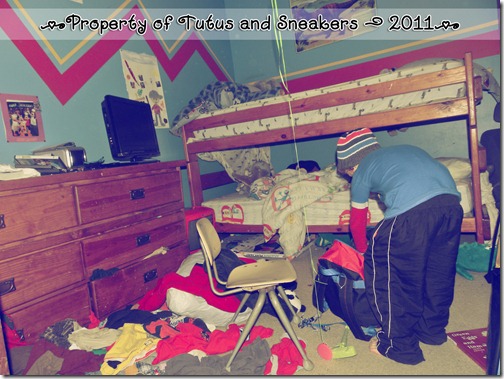
I had some ADORABLE shots of Princess Pudding terrorizing Prince Wild I was planning to use, then, lol – sorry know I shouldn’t laugh before I get to the punch line but seriously… lol, Prince Zoo threw the most Bob-Awful fit because I would not let him watch a movie since he refused to help clean up. His fit consisted of slamming doors, yelling that no one loves him, and ((lol – my favorite)) that he is running away to join the army. lol. Seriously? You don’t get your way so you want to go join the ARMY??? lol. Anyhoos, I got a good sneaky picture of him in his room “packing.” Today’s photo has absolutely no editing except the action I applied. No step-by-step or even generals to give you on this one.

SOOC – Prince Zoo, January 4, 2011
TaS1411a

Edit – On The Spot Studio’s Sweet Vintage from her Sweet and Low action set.
TaS1411b

Click them for the full size, especially the edit. The shrinkage to fit the blog leaves a lot to be desired.

Be sure to check back Friday for info on my next contest!!! The next four contests will end with a prize that a kiddo can wear. ;o)

Monday, January 3, 2011

Day 3

Joy of joy, all my kiddos are back home. :o) I’m sure they’ll be back to driving me crazy soon again, but I’m just so happy to have them back home.

I got some great pictures of them while they were brushing their teeth tonight after dinner, but here’s my favorite one of the one and only Prince Wild.

SOOC – January 3, 2011, Prince Wild

Editing – layer adjustments: levels and color balance, clone out some of the tooth paste spots on the mirror the boys added, selective sharpening, and a few color and contrast punches. (click for full size)

Special edit – My Four Hens’ Koolaid Kisses from her Light and Bright action set at 75% opacity. Gives it a nice vintage look. (click for full size)

Sunday, January 2, 2011

Day 2

Ugh, ok, hopefully with tomorrow getting us all back to normal at home I’ll be able to do a long step-by-step. But seriously, I’ve had two completely and fully kid-free days now, so all I have is a picture of how the hubs has spent a good chunk of his weekend. Not even cute enough to do a special edit.
DSCN9850

Be sure to come back Friday to check out the new contest!!!

Christmas Time Contest Winner!!

First, let me say thank you to all who entered!! The next contest will be announced Friday. :o)
Next, have a look at the wonderful entries:

by In the Moment Photography

by The Unexpected
By Silent Storm
By Kasi's Corner
by Just Me and My Boys
by Three Little Snapshots
by Snips and Snails and Sugar and Spice
by The Creative Side of a Misfit

And now… the winner! Please email me at tutusandsneakers@gmail.com to collect you prize.
Untitled-1

Untitled-2
Again thank you all so much for entering I enjoyed all of your beautiful pictures.

Saturday, January 1, 2011

Day 1

It’s finally here! My first official 365 post!!! I was going to open it with a step-by-step instruction, but since I am posting this so late I just don’t have the energy for it. So… I’ll do that tomorrow.

Here’s today’s picture, Princess Pudding’s footsies. (You will come to learn… I love taking pictures of the kiddos’ footsies. lol)
SOOC – Jan 1, 2011
 

Editing – Crop, Clone out shadow, layer adjustments – levels: color balance, brightness/contrast; selective sharpening, smoothen the skin. (Click for full size)

Special edit – On the Spot Studios Tea Party action from her Make Believe set – not currently available - at 60% opacity. (click for full size)